Leggett & Platt adjustable bed
remote replacement
Identify remotes, control boxes, and replacement paths
for your Leggett & Platt adjustable base.

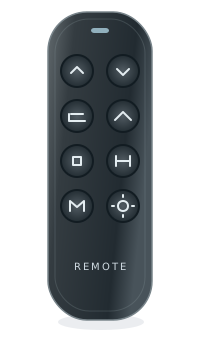
on your exact base
Find the electronics label, not just the brand
The name on the bed and the electronics manufacturer may differ. A shared brand or manufacturer does not establish fit.
For support, record the complete remote and control-box labels, base model, revision and observed symptom. Ask the manufacturer to confirm a directed replacement and any pairing or feature limitations in writing.
Find parts or repair help
- Identify the bed and its electronics
Keep the retail brand, base model and component labels separate.
- Prepare for a repair assessment
Take the labels, symptoms and checks already tried to a qualified provider. No repair-service booking is offered here.
- Prepare a model-specific support request
Ask the responsible brand or manufacturer to confirm the original part, replacement direction and conditions in writing.
Remote, control box, motor or cable?
- Check a replacement hand control
Keep wired and wireless versions, full part numbers and revisions separate.
- Check a control box or receiver
Identify the original system before comparing replacement electronics.
- Identify a motor or actuator
A movement problem does not identify a failed motor. Do not dismantle the base to read a label.
- Check cables and connectors
Record the complete system; a matching plug shape is not proof of fit.
These are identification and assessment routes, not confirmed products or a diagnosis. Do not order from appearance, a connector or a marketplace title alone.
Leggett & Platt base models
Find your base modelWe don’t have reviewed model records for this brand yet. You can still check a label number in the Finder.
Enter your modelCommon replacement paths
How to identify your Leggett & Platt base
Here are the most common places to find your model or part number.
On the remote
Look on the back of your remote for a model number, FCC ID, or part number.
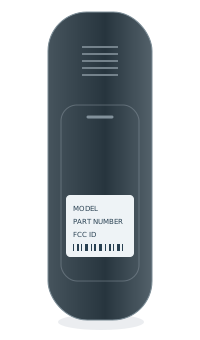 BACK OF REMOTEModel numberPart no. / FCC ID
Inside the battery cover
Some model numbers are printed inside the battery compartment.
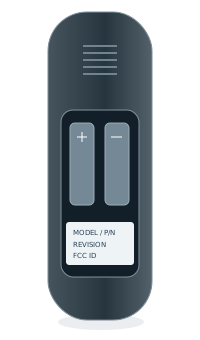 INSIDE BATTERY COVERModel numberPart no. / FCC ID
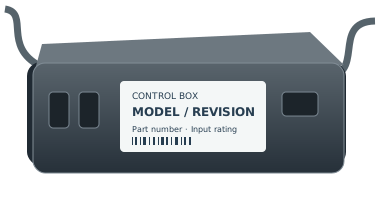
Under the bed base
Look for a label on the control box or frame, usually near the head section.
Frequently asked questions
How we check a matchCan I use a universal remote?
A similar shape or button layout does not confirm compatibility. Check the full part number and a documented replacement path for your exact system.
What if my remote looks the same but the number is different?
Treat it as a different variant until the manufacturer or another reliable source confirms the replacement.
Can I replace just the remote?
Some systems support a remote-only replacement. Others need a matched control box and remote. We only recommend a path when it has enough evidence.
What if I only know the control box model?
Start with the control box route. Enter the manufacturer, complete model, and revision from its label.