Identify your Lucid adjustable base
Find Lucid model-identification resources and separate Advanced v1 from Advanced Series A manuals. Prepare base and remote photos for a specific support request.

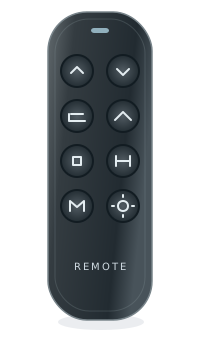
on your exact base
Find the electronics label, not just the brand
The name on the bed and the electronics manufacturer may differ. A shared brand or manufacturer does not establish fit.
For support, record the complete remote and control-box labels, base model, revision and observed symptom. Ask the manufacturer to confirm a directed replacement and any pairing or feature limitations in writing.
Find parts or repair help
- Identify the bed and its electronics
Keep the retail brand, base model and component labels separate.
- Prepare for a repair assessment
Take the labels, symptoms and checks already tried to a qualified provider. No repair-service booking is offered here.
- Prepare a model-specific support request
Ask the responsible brand or manufacturer to confirm the original part, replacement direction and conditions in writing.
Remote, control box, motor or cable?
- Check a replacement hand control
Keep wired and wireless versions, full part numbers and revisions separate.
- Check a control box or receiver
Identify the original system before comparing replacement electronics.
- Identify a motor or actuator
A movement problem does not identify a failed motor. Do not dismantle the base to read a label.
- Check cables and connectors
Record the complete system; a matching plug shape is not proof of fit.
These are identification and assessment routes, not confirmed products or a diagnosis. Do not order from appearance, a connector or a marketplace title alone.
Identify a Lucid base before asking about its remote
Lucid’s official identification article separates base models and manual generations. Start with the manual cover, then use the correct generation link below. A mattress brand or a remote photograph does not identify a replacement component.
- Manual cover
- Use the base model name or number, not the mattress label
Identifier reference - Unclear identity
- Ask Lucid support to review photographs of the remote and base
Identifier reference - Advanced v1 manual route
- Separate attachment linked by Lucid’s model-identification article
Identifier reference - Advanced Series A manual route
- Different attachment; its cover says Advanced Adjustable Base and includes a Serial No. space
Identifier reference
Keep Advanced v1 and Advanced Series A separate
Lucid’s article links these as different manual entries. The Series A download’s cover uses the broader Advanced Adjustable Base title, so the cover title alone does not establish which generation you own. Keep the article’s generation label, the manual link and the serial information together.
If you only recognize “Advanced,” send the base and remote photographs to Lucid rather than choosing a generation by appearance. The article also has separate entries for L100, L150, L300 and L600; do not apply an Advanced manual to one of those models.
Source and scope Source and scope 2 Source and scope 3Separate base identification from a replacement request
The official article asks owners who still cannot identify a base to provide photos of the remote and base. Once the model and generation are established, ask support for the exact remote/control-unit number and any revision limits. This catalog has no reviewed Lucid component variants or verified replacement route.
Source and scopeYour next step
- Check the manual cover for the full base name and generation.
- Photograph the remote and base for the support request.
- Ask Lucid to identify the model, then confirm any proposed replacement against its exact configuration.
These notes help identify the part. They do not verify a replacement or add a purchase recommendation. How we assess evidence
Lucid base models
Find your base modelWe don’t have reviewed model records for this brand yet. You can still check a label number in the Finder.
Enter your modelCommon replacement paths
How to identify your Lucid base
Here are the most common places to find your model or part number.
On the remote
Look on the back of your remote for a model number, FCC ID, or part number.
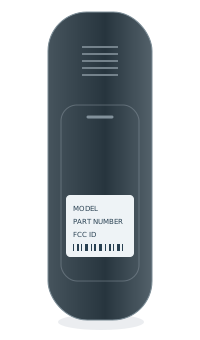 BACK OF REMOTEModel numberPart no. / FCC ID
Inside the battery cover
Some model numbers are printed inside the battery compartment.
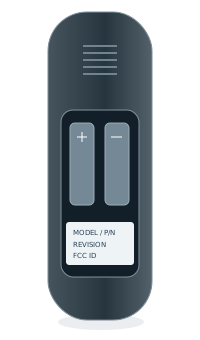 INSIDE BATTERY COVERModel numberPart no. / FCC ID
Under the bed base
Look for a label on the control box or frame, usually near the head section.
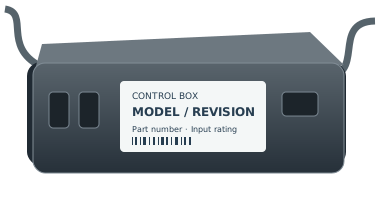
Frequently asked questions
How we check a matchCan I use a universal remote?
A similar shape or button layout does not confirm compatibility. Check the full part number and a documented replacement path for your exact system.
What if my remote looks the same but the number is different?
Treat it as a different variant until the manufacturer or another reliable source confirms the replacement.
Can I replace just the remote?
Some systems support a remote-only replacement. Others need a matched control box and remote. We only recommend a path when it has enough evidence.
What if I only know the control box model?
Start with the control box route. Enter the manufacturer, complete model, and revision from its label.