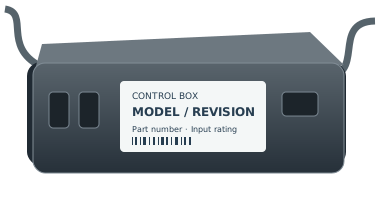
Control box family
LINAK CBD6DC HOMELINE control box
Official LINAK control-box family. Application guidance is available, but an exact customer-specific item code is still needed before a replacement can be confirmed.
Identify the exact part before replacing it
Official LINAK control-box family. Application guidance is available, but an exact customer-specific item code is still needed before a replacement can be confirmed.
Replacement fit is not confirmed by the family name. Copy the full part number and revision from the remote back, battery compartment or accessible control-box label. If it is unsafe to reach a label, ask for help.
For support, record the complete remote and control-box labels, base model, revision and observed symptom. Ask the manufacturer to confirm a directed replacement and any pairing or feature limitations in writing.
Identification review · 2026-10-26
CBD6DC HOMELINE: identify the control box and its configuration
The official LINAK CBD6DC HOMELINE manual identifies its scope, document edition and service route. Use that reference to prepare a configuration request; CBD6DC is still a family name, not a confirmed replacement item code.
- Manufacturer family
- CBD6DC HOMELINE
Identifier reference - Replacement item code
- Not established in Dataset v1.0.0
Identifier reference - Official document edition
- 2024-10 · LIT-23-02-030 A (manual page 19)
Identifier reference - Document scope
- CBD6DC HOMELINE control box; TD4 Advanced and TD5 Advanced listed on page 4
Identifier reference
Check the scope before using a CBD6D search result
Manual page 4 explicitly names CBD6DC HOMELINE. Keep the full CBD6DC wording and HOMELINE designation when comparing your label with a document; a result for a similarly named control box is not enough. The actuators listed on that scope page are document context, not a guarantee for an unidentified retail bed.
Source and scopeRecord the external supply separately
Page 15 describes the control box as requiring an external power supply. Photograph the accessible control-box and supply labels separately, without opening the housing or entering a moving mechanism. The family name does not establish your installed supply, customer-specific item code or remote configuration.
Source and scopeUse the documented spare-parts route
Page 18 directs spare-parts questions to the nearest LINAK sales office and limits repairs to authorized service. Ask the original system supplier or that office to identify the configured item code from the full label and base information. Do not open the product to identify internal parts.
Source and scopeHC10 documentation has receiver and adapter conditions
The HC10 manual’s page 22 describes dual pairing for HC12 with software SW0077075, version 1.04, produced from November 2017. Its CBD6DC HOMELINE example uses Bluetooth adapters and excludes a LINbus cable between the two products. This describes a qualified system configuration; it does not confirm that an unidentified HC10-family remote fits any CBD6DC control box.
Keep the hand-control model, software, control-box label and adapter identity together when asking the original supplier to check your installed system. Do not infer integrated Bluetooth from the CBD6DC family name.
Source and scopeYour next step
- Photograph the full accessible CBD6DC label and the separate power-supply label.
- Record the manual edition and full base identity; do not shorten the control-box family name.
- Ask the original supplier or LINAK sales office for the configured ordering code and system confirmation.
These notes help identify the part. They do not verify a replacement or add a purchase recommendation. How we assess evidence
Revision matters
Confirm the complete model, revision, connector configuration, and part number. A similar connector alone won’t confirm a match.
Check this control boxNot sure where to look?
Here are the most common places to find your model or part number.
1
On the remote
Look on the back of your remote for a model number, FCC ID, or part number.
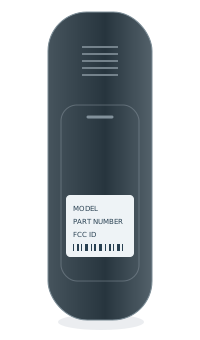 BACK OF REMOTEModel numberPart no. / FCC ID
2
Inside the battery cover
Some model numbers are printed inside the battery compartment.
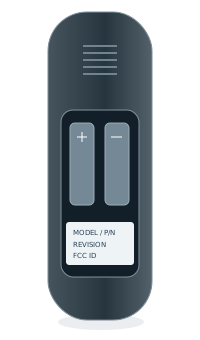 INSIDE BATTERY COVERModel numberPart no. / FCC ID
3
Under the bed base
Look for a label on the control box or frame, usually near the head section.