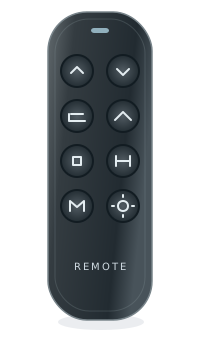
The reviewed BTX4 remote options are RM BTX4 BT and RM BTX4 RF. Bluetooth and Radio Frequency are distinct source selections; BTX4 on its own does not choose between them.
Sources included · Dataset 1.0.0 reviewed September 2026
Use the complete BedTech store SKU and selected radio-type option. The brand page does not establish an electronics OEM or interchangeability between options.
Replacement fit is not confirmed by the family name. Copy the full part number and revision from the remote back, battery compartment or accessible control-box label. If it is unsafe to reach a label, ask for help.
Do not assume one version replaces another. Read the original label before choosing a record. A revision has not been selected for you.
For support, record the complete remote and control-box labels, base model, revision and observed symptom. Ask the manufacturer to confirm a directed replacement and any pairing or feature limitations in writing.
Read the last field of the remote name
RM BTX4 BT is the Bluetooth option; RM BTX4 RF is the Radio Frequency option. Keep the BT or RF suffix with the BTX4 model when copying a label or supplier description. The evidence names the two applications independently and does not document either handset as the successor of the other.
The radio option doesn’t tell you the box year
Choose the remote communication option from the original equipment details, rather than from a guessed purchase year. Control-box production choices answer a different identification question. These remote records do not contain a direct box-to-handset pairing proof, so the presence of the same BTX4 base name does not establish a new pair by itself.
Resolve an unreadable suffix before ordering
If only BTX4 is legible, retain that partial result and check the back of the remote or inside its battery cover for a fuller label. Collect the control-box number as supporting context. Finder can preserve those details without selecting a radio option for you. Button appearance and the BTX4 prefix alone remain insufficient purchasing evidence.
All part identifiers and configuration details
Identify the exact version
2 reviewed records
These are different versions within this family. Check the full identifier; they aren’t automatically interchangeable.
Part identifiers and details to check
Part or version
Documented label details
What still needs checking
RM BTX4 BT
store sku: RM BTX4 BT
source option: Bluetooth
Revision / program: Bluetooth
This identification record doesn’t provide a verified remote FCC ID or guarantee which features will be preserved. Check this exact part →
RM BTX4 RF
store sku: RM BTX4 RF
source option: Radio Frequency
Revision / program: Radio Frequency
This identification record doesn’t provide a verified remote FCC ID or guarantee which features will be preserved. Check this exact part →
Detailed relationship records and source claims
What the sources confirm
Source-specific evidence
Read each match in the direction shown and check its conditions. A listed base or control-box match tells you which remote it uses; it doesn’t name a replacement for another remote.
Documented matches: check the direction and conditions
Official BedTech part option for BTX4 / Bluetooth. Confirm this exact option; Bluetooth and RF are separate, and year ranges do not establish a radio type.
Official BedTech part option for BTX4 / Radio Frequency. Confirm this exact option; Bluetooth and RF are separate, and year ranges do not establish a radio type.
Evidence dates describe the reviewed records. They are not a promise of continuous monitoring. Read the verification method.
Remote ControlsManufacturer verified · BedTech
Reviewed 2026-09-22 · 11 relevant claims.
Use the complete BedTech store SKU and selected radio-type option. The brand page does not establish an electronics OEM or interchangeability between options.
With your permission, Google Analytics and our Stock Business Tracker help us understand visits, Finder use and affiliate link activity. Neither is required to use the Finder. Read our privacy policy.
Your choice is stored in a non-identifying session cookie. Change or withdraw permission using “Analytics choices” in the footer.